Tutorial: 3D scenes
1. Examples
If you prefer directly jumping to example code, see:
2. MRPT Rendering Architecture
2.1 Two-module design: <tt>mrpt_viz</tt> and <tt>mrpt_opengl</tt>
In MRPT 3.0, the 3D scene graph and the OpenGL rendering code live in two separate modules:
mrpt_viz (namespace
mrpt::viz): Abstract scene graph. No OpenGL/GPU dependencies.mrpt_opengl (namespace
mrpt::opengl): GPU rendering, shaders, textures, OpenGL calls.
mrpt_viz defines all the visual primitives (CBox, CSphere, CGridPlaneXY, CPointCloud, etc.), the scene container (Scene), viewports (Viewport), and camera (CCamera). It has virtually no external dependencies beyond MRPT core libraries, making it usable on systems without GPU or OpenGL.
mrpt_opengl takes a mrpt::viz::Scene and renders it using OpenGL. It uses a “compiled scene” approach where abstract viz objects are translated into GPU-side proxies that own the actual OpenGL buffers (VBOs, VAOs, textures).
2.2 Key class hierarchy (mrpt_viz)
mrpt::viz::CVisualObject(base: pose, color, name, visibility, dirty flag) ├── VisualObjectParams_Triangles (mixin: triangle buffer, lighting, cull face) ├── VisualObjectParams_TexturedTriangles (mixin: textured triangle buffer + texture image) ├── VisualObjectParams_Lines (mixin: line buffer, line width, anti-aliasing) └── VisualObjectParams_Points(mixin: point buffer, point size)
Concrete primitives inherit from CVisualObject and one or more of the VisualObjectParams_* mixins to declare which shader types they need. For example:
CGridPlaneXYinheritsCVisualObject+VisualObjectParams_Lines(lines only)CSphereinheritsCVisualObject+VisualObjectParams_Triangles(triangles only)CBoxinheritsCVisualObject+VisualObjectParams_Triangles+VisualObjectParams_Lines(both: solid faces + wireframe edges)
The scene graph is:
Scene └── Viewport[] ("main" always exists) ├── CCamera ├── TLightParameters └── CVisualObject[] (the objects to render) └── CSetOfObjects (recursive container)
2.3 Key class hierarchy (mrpt_opengl) and the Proxy pattern
mrpt::opengl::RenderableProxy(base: compile, updateBuffers, render, requiredShaders) ├── PointsProxyBase→ renders VisualObjectParams_Points data ├── LinesProxyBase → renders VisualObjectParams_Lines data ├── TrianglesProxyBase → renders VisualObjectParams_Triangles data │└── TexturedTrianglesProxyBase → adds texture support └── (Text3DProxy) → internal: generates triangle geometry from CText3D
Each RenderableProxy owns the GPU resources (buffers, VAO) for one rendering pass of one viz object. The proxies are created and managed by CompiledScene.
The overall rendering pipeline classes are:
CompiledScenemanages all proxies, performs incremental updates ├── ShaderProgramManager owns loaded shader programs └── CompiledViewport[]one per viz::Viewport ├── RenderableProxy[] organized by shader ID for batched rendering ├── TRenderMatricesprojection/view/model matrix state └── FrameBuffer (optional: shadow map FBO)
2.4 Rendering data flow
The rendering pipeline has three phases:
Phase 1: Scene compilation (<tt>CompiledScene::compile()</tt>)
For each CVisualObject in the scene:
Call
obj->updateBuffers()- the viz object populates its internal CPU-side data buffers (triangles, lines, points) from its geometric parameters.Create a
RenderableProxyof the appropriate type based on the object’sVisualObjectParams_*mixin(s).Call
proxy->compile(obj)- the proxy reads the viz object’s CPU-side buffers and uploads them to GPU (creates VBOs, VAOs).Store
proxy->m_modelMatrixcomputed from the object’s pose and parent transforms.
Phase 2: Incremental updates (<tt>CompiledScene::updateIfNeeded()</tt>)
Each frame, before rendering:
Cleanup : Remove proxies whose source objects were deleted (detected via
weak_ptrexpiration).New objects : Scan the source scene for objects not yet compiled; compile them.
Dirty objects : For each tracked object where
hasToUpdateBuffers()==true:Call
obj->updateBuffers()(viz side: regenerate CPU buffers)Call
proxy->updateBuffers(obj)(opengl side: re-upload to GPU)Call
obj->clearChangedFlag()
Phase 3: Rendering (<tt>CompiledViewport::render()</tt>)
For each viewport:
Compute pixel viewport from normalized coordinates.
Update projection/view matrices from camera.
Optionally render shadow map (1st pass into depth FBO).
Build a
RenderQueue: group proxies by shader ID, with depth sorting.Process the queue: for each shader, bind it once, then render all objects using that shader (uploading per-object model matrix uniforms).
Dirty flag mechanism
User modifies a viz object (e.g.,
box.setBoxCorners(...))The setter calls
notifyChange(), which sets a per-thread dirty flag (PerThreadDataHolder<OutdatedState>) totruefor all threads.Before rendering, the GL thread checks
hasToUpdateBuffers()which reads the GL thread’s slot - returnstrue.After update,
clearChangedFlag()resets all per-thread slots.
2.5 Off-screen rendering with CFBORender
mrpt::opengl::CFBORender provides off-screen rendering without a GUI window:
Creates its own EGL context (headless rendering, works without a display).
Maintains a
CompiledSceneinternally (lazy-initialized on first render).Supports RGB and RGB+D output.
Camera can be overridden via
setCamera().
2.6 Shader system
The rendering pipeline uses a set of built-in GLSL shader programs, each identified by a numeric ID defined in mrpt::opengl::DefaultShaderID. Shaders are a property of viewports (each mrpt::viz::Viewport can have its own shader set), and users can override individual shaders for custom effects (see the example Example: opengl_custom_shaders_demo).
Built-in shaders
The following shaders are defined (GLSL 3.30 core profile, source files live in modules/mrpt_opengl/shaders/):
POINTS (ID 0): Renders point primitives. Vertex shader transforms positions by the model-view-projection matrix; fragment shader outputs the per-vertex color.
WIREFRAME (ID 1): Renders line primitives (wireframe edges, grids, CSetOfLines, CSimpleLine). Supports per-vertex color.
TEXT (ID 2): Renders 2D text overlays (addTextMessage). Uses an orthographic projection so text is always screen-aligned.
SKYBOX (ID 5): Renders a cube-mapped skybox behind the scene.
TRIANGLES_LIGHT (ID 10): Renders lit, non-textured triangles with Phong-like directional lighting. Accepts ambient, diffuse, and specular light parameters from TLightParameters.
TEXTURED_TRIANGLES_LIGHT (ID 11): Same as TRIANGLES_LIGHT but samples a diffuse texture map. Used by CSetOfTexturedTriangles, CMesh with textures, CAssimpModel textured meshes, etc.
TRIANGLES_NO_LIGHT (ID 12): Renders unlit, non-textured triangles (flat color from vertex attributes). Used when lighting is disabled.
TEXTURED_TRIANGLES_NO_LIGHT (ID 13): Unlit textured triangles.
TRIANGLES_SHADOW_1ST (ID 20): First pass of shadow mapping. Renders the scene from the light’s point of view into a depth-only FBO. Used for both textured and non-textured triangles.
TRIANGLES_SHADOW_2ND (ID 21): Second pass of shadow mapping. Renders lit triangles while sampling the shadow depth map to determine whether each fragment is in shadow. Includes PCF soft-shadow filtering (see below).
TEXTURED_TRIANGLES_SHADOW_2ND (ID 23): Same as TRIANGLES_SHADOW_2ND but with diffuse texture sampling.
DEBUG_TEXTURE_TO_SCREEN (ID 30): Debug helper that renders a texture as a full-screen quad (useful for visualizing the shadow map).
Custom shaders
To install a custom shader on a viewport:
auto vp = scene.getViewport(); vp->loadDefaultShaders(); const auto id = mrpt::viz::DefaultShaderID::TRIANGLES_NO_LIGHT; vp->shaders()[id] = myCustomShader;
The custom shader must declare the same uniforms and attributes as the built-in shader it replaces.
2.7 Shadow mapping
MRPT supports real-time shadow mapping for directional lights using a standard two-pass algorithm with Percentage-Closer Filtering (PCF).
Enabling shadows
Shadows are controlled per-viewport via TLightParameters, which is a member of mrpt::viz::Viewport. To enable shadows, set viewport->lightParameters().shadow_map_enabled = true; and configure the light direction via viewport->lightParameters().direction.
How it works
Pass 1 (depth from light): The scene is rendered from the light’s viewpoint into a depth-only framebuffer (the “shadow map”). The light uses an orthographic projection whose extent is automatically computed from the scene’s bounding box and the camera’s distance to the origin. The shadow map resolution defaults to 2048 x 2048 pixels and can be configured. Shaders used: TRIANGLES_SHADOW_1ST (ID 20).
Pass 2 (render with shadows): The scene is rendered normally from the camera’s viewpoint. For each fragment, the shadow shader transforms the fragment position into the light’s clip space and samples the shadow map to determine if the fragment is occluded. If the depth stored in the shadow map is less than the fragment’s depth from the light, the fragment is in shadow and its lighting contribution is reduced to ambient only. Shaders used: TRIANGLES_SHADOW_2ND (ID 21) and TEXTURED_TRIANGLES_SHADOW_2ND (ID 23).
PCF soft shadows
The shadow fragment shader (shadow-calculation.f.glsl) uses a 3 x 3 PCF kernel: it samples 9 neighboring texels in the shadow map and averages the results, producing soft shadow edges instead of hard aliased boundaries.
Three bias parameters prevent shadow acne (self-shadowing artifacts):
shadow_bias: constant depth bias.shadow_bias_cam2frag: bias proportional to distance from camera.shadow_bias_normal: bias proportional to surface angle relative to the light direction (1 - dot(normal, light_direction)).
Light configuration
Shadow-related fields in mrpt::viz::TLightParameters:
direction: Direction vector of the directional light.shadow_map_enabled: Enable/disable shadow mapping.eyeDistance2lightShadowExtension: Controls the light frustum size relative to the eye-to-origin distance.minimum_shadow_map_extension_ratio: Ensures a minimum frustum coverage.
2.8 Proxy system details
Each CVisualObject in the scene can produce multiple rendering proxies (one per shader type it requires). For example, a CBox with both solid faces and wireframe edges gets two proxies: a TrianglesProxy and a LinesProxy. The function createProxiesByType() inspects the object’s VisualObjectParams_* mixins and creates one proxy for each.
When an object is marked dirty (via notifyChange()), the incremental update path (updateDirtyObjectRecursive()) recomputes the model matrix and re-uploads geometry buffers for all of the object’s proxies.
Frustum culling is performed in the render queue builder: each proxy’s bounding box is tested against the view frustum using a conservative 8-corner intersection test, and invisible proxies are skipped.
3. Relevant C++ classes
The main class for building 3D scenes is mrpt::viz::Scene, which allows the user to create, load, save, and render 3D scenes using predefined 3D entities.
A Scene contains one or more Viewports (mrpt::viz::Viewport), each one associated with a set of visual objects and, optionally, a preferred camera position. Both orthogonal (2D/3D) and projective camera models can be used for each viewport independently.
An instance of mrpt::viz::Scene always contains at least one viewport (mrpt::viz::Viewport) named "main", covering the entire window area by default. If you do not provide a viewport name in API calls, "main" will always be used by default.
Viewports are referenced by their names (case-sensitive strings). Each viewport contains a different 3D scene (i.e. they render different objects), though a mechanism exists to share the same 3D scene by a number of viewports so memory is not wasted replicating the same smart pointers (see mrpt::viz::Viewport::setCloneView()).
Users will never normally need to invoke rendering manually, but use instead:
Off-screen rendering: mrpt::opengl::CFBORender
the 3D standalone viewer: Application: SceneViewer3D
the basic runtime 3D display windows mrpt::gui::CDisplayWindow3D
the advanced GUI-controls capable display mrpt::gui::CDisplayWindowGUI
An object mrpt::viz::Scene can be saved to a .3Dscene file using mrpt::viz::Scene::saveToFile(), for posterior visualization from the standalone application SceneViewer3D.
4. Creating, populating and updating a Scene
Since 3D rendering is performed in a detached thread, special care must be taken when updating the 3D scene to be rendered. Updating here means either (i) inserting/removing new primitives to the Scene object associated with a CDisplayWindow3D, or (ii) modifying the pose, color, contents, etc. of any of the primitives previously inserted into such Scene object.
To avoid race conditions (rendering always happens on a standalone thread), the process of updating a 3D scene must make use of a mechanism that locks/unlocks an internal critical section, and it comprises these steps:
// Create the GUI window object. mrpt::gui::CDisplayWindow3D win(“My window”, 1024, 800);
// Lock the 3D scene (Enter critical section) mrpt::viz::Scene::Ptr &ptrScene = win.get3DSceneAndLock();
// Modify the scene or the primitives therein: ptrScene->…
// Unlock the 3D scene (Exit critical section). win.unlockAccess3DScene();
// Force a window update, if required: win.forceRepaint();
An alternative way of updating the scene is by creating, before locking the 3D window, a new object of class Scene, then locking the window only for replacing the smart pointer. This may be advantageous if generating the 3D scene takes a long time, since while the window is locked it will not be responsive to the user input or window redraw.
5. Existing visualization primitives
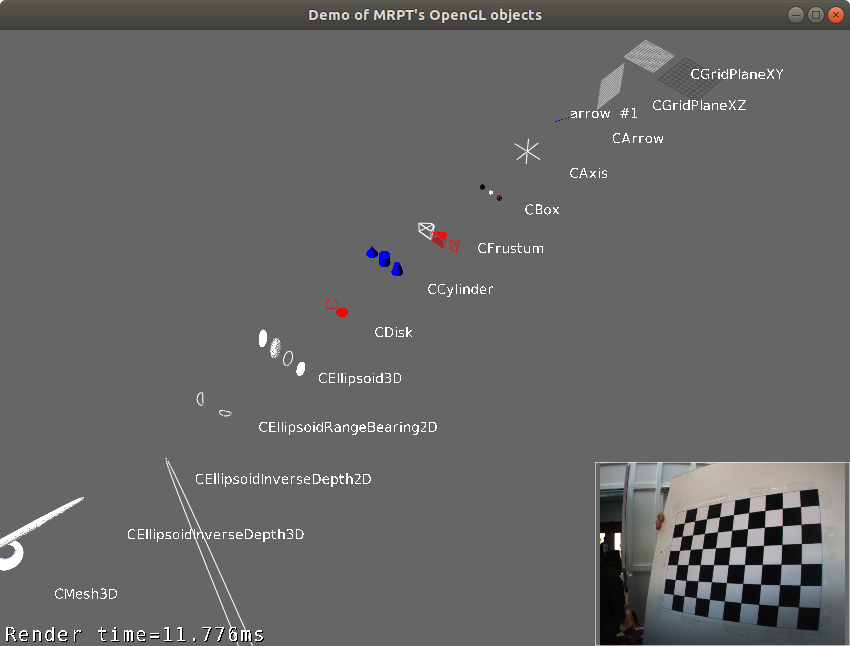
For a list of existing visualization primitive classes, browse the namespace mrpt::viz, or inspect the example: Example: opengl_objects_demo
6. Text messages
GUI windows offer the possibility of displaying any number of text labels on top of the rendered scene. Refer to:
API: mrpt::gui::CDisplayWindow3D::addTextMessage()
7. Advanced UI controls
For more advanced UI controls, including subwindows that can be dragged, minimized and restored, etc. see:
mrpt::gui::CDisplayWindowGUI
8. What’s new in MRPT 3
8.1 Architecture changes
Two-module split : The scene graph (
mrpt_viz) is now fully decoupled from the OpenGL renderer (mrpt_opengl). Scenes can be built and serialized on systems with no GPU.Proxy pattern : Each visual object is compiled into one or more
RenderableProxyobjects that own all GPU resources. Incremental updates only re-upload data for dirty objects.Shader-based pipeline : All rendering now goes through GLSL shaders. The fixed-function OpenGL pipeline is gone. Custom shaders can be installed per-viewport via
ShaderProgramManager.Shadow mapping : Real-time PCF soft shadows for directional lights, implemented as a two-pass depth-map algorithm.
Sky box :
mrpt::viz::CSkyBoxrenders a cube-mapped background at “infinity” via the dedicatedSKYBOXshader andSkyBoxProxy.Off-screen rendering :
CFBORenderuses EGL for true headless rendering without a display server.
8.2 Rendering quality improvements
Blinn-Phong specular lighting (MRPT 2.14): All four lighting shaders switched from Phong (
reflect()) to Blinn-Phong (half-vector). Per-object specular exponent exposed viaCVisualObject::materialSpecularExponent()(default 32; typical range 8–128). Also fixed: specular intensity was never uploaded for textured objects due to a uniform name mismatch.Gamma-correct rendering (MRPT 2.14): All color textures are stored internally as
GL_SRGB8/GL_SRGB8_ALPHA8;GL_FRAMEBUFFER_SRGBis enabled during rendering so the GPU handles the full sRGB pipeline for free (decode at sampling, encode at output). Controlled byTLightParameters::gamma_correction(default:true).CFBORender‘s framebuffer attachment also usesGL_SRGB8so off-screen output is equally correct.
9. TO-DO list
Proposed improvements:
Tier 1 - Low effort, high visual impact
Multiple light sources (up to N directional/point lights)
Currently there’s a single TLightParameters per viewport with one direction vector. This is the single biggest limitation for scene realism.
Proposal:
Change Viewport to hold a std::vector<TLightParameters> (max 4-8, configurable).
Add a type field to TLightParameters: Directional, Point, Spot.
For point/spot lights, add position, attenuation (constant/linear/quadratic), and for spot: cutoffAngle, outerCutoffAngle.
In the lighting shaders, loop over an array of light uniforms. With a small fixed max (4), the loop unrolls and there’s zero branching cost.
Shadow mapping would remain single-light (the “sun” / primary directional) to avoid the cost of multiple shadow maps.
GPU cost: negligible for 4 lights (4 dot products per fragment). Even Intel HD 4000 handles this fine.
Configurable specular exponent / Blinn-Phong DONE
The specular exponent is hardcoded at 16. The existing materialShininess field only scales the specular intensity, not the exponent.
Implemented:
Added
CVisualObject::materialSpecularExponent(float)(default 32). The existingmaterialShininessfield retains its role as the specular intensity scale [0,1].All four lighting shaders switched from Phong (
reflect()) to Blinn-Phong (half-vectornormalize(viewDir - lightDir)): cheaper, better at grazing angles.materialSpecularExponentuploaded as a per-object uniform inTrianglesProxyandTexturedTrianglesProxy.Also fixed a pre-existing bug:
TexturedTrianglesProxywas checking for uniform"materialShininess"while the shader declares"materialSpecular", so specular intensity was silently never uploaded for textured objects.
Gamma correction DONE
All lighting math is currently done in sRGB space, which causes colors to look washed out and lighting falloff to be perceptually wrong. This is the single most common rendering mistake.
Implemented via the GPU sRGB pipeline (zero shader cost):
All color textures are uploaded with
GL_SRGB8/GL_SRGB8_ALPHA8internal format → GPU auto-decodes sRGB→linear at sampling time.GL_FRAMEBUFFER_SRGBis enabled duringCompiledViewport::render()→ GPU auto-encodes linear→sRGB on framebuffer write.CFBORender‘s color attachment usesGL_SRGB8so off-screen rendering also benefits.Controlled by
TLightParameters::gamma_correction(default: true). Set tofalseto restore the legacy linear appearance.
GPU cost: literally zero (hardware LUT on both ends).
Emissive term
Some objects (displays, indicator lights, laser beams, warning signs) should glow regardless of lighting. Currently there’s no way to do this.
Proposal:
Add materialEmissive (TColorf, default black) to CVisualObject.
Add it to the lighting equation as: finalColor = emissive + (ambient + diffuse + specular) * materialColor.
One extra uniform, one extra add in the shader.
Tier 2 - Moderate effort, significant quality improvement
Normal mapping
Normal maps add dramatic surface detail (brick walls, terrain, metal panels) without extra geometry. This is the single biggest visual quality improvement per GPU cycle.
Proposal:
Add texture unit 2 for normal maps.
Add assignNormalMap(CImage) to objects that support textures (CSetOfTexturedTriangles, CMesh, CAssimpModel).
Compute tangent/bitangent per-vertex during mesh loading (Assimp already provides these via aiProcess_CalcTangentSpace).
Add tangent attribute (location 4) to the vertex format.
In the fragment shader: sample the normal map, transform from tangent space to world space, use the perturbed normal for lighting.
When no normal map is assigned, the shader samples a 1x1 flat-blue texture (0.5, 0.5, 1.0) which produces the identity normal - zero branching.
GPU cost: one extra texture sample + one matrix multiply per fragment. Runs fine on any GPU from 2012 onwards.
Specular/gloss map support
Allows per-texel variation of shininess (e.g. wet vs dry areas, metallic highlights on a robot chassis).
Proposal:
Add texture unit 3 for a specular/gloss map (R = specular intensity, G = exponent or roughness).
When not assigned, use a 1x1 default matching the per-object material values.
Minimal shader cost: one extra texture sample.
Simple distance fog
Useful for outdoor robotics scenes, large point clouds, depth cueing.
Proposal:
Add to Viewport or TLightParameters: fogEnabled, fogColor, fogNear, fogFar, fogDensity, fogMode (linear/exponential).
In the fragment shader: float fogFactor = clamp((fogFar - dist) / (fogFar - fogNear), 0, 1); color = mix(fogColor, color, fogFactor);
One subtract, one divide, one mix per fragment.
GPU cost: essentially zero.
Hemisphere ambient lighting
Replace the flat ambient scalar with a sky/ground color pair. Surfaces facing up get sky ambient, surfaces facing down get ground ambient, with smooth interpolation. Much more
natural outdoor look.
Proposal:
Add ambientSkyColor and ambientGroundColor to TLightParameters (default both to current ambient * color).
In shader: vec3 ambientColor = mix(groundColor, skyColor, 0.5 + 0.5 * normal.z);
One mix per fragment, no extra textures.
Tier 3 - Higher effort, nice-to-have
Screen-Space Ambient Occlusion (SSAO)
Adds contact shadows in crevices and corners. Very noticeable quality improvement for dense geometry (robot models, indoor scenes).
Proposal:
Render a depth+normal G-buffer (can reuse existing depth output).
Run a full-screen SSAO pass sampling ~16 random hemisphere points.
Blur the AO result (separable Gaussian, 2 passes).
Multiply into the ambient term.
Use a 4x4 random rotation texture to reduce sample count while maintaining quality.
Make it optional (off by default) since it costs a full-screen pass.
GPU cost: moderate (16 texture samples per pixel + 2 blur passes). Should be off by default but available for quality rendering and screenshots.
Cascaded Shadow Maps (CSM)
The current single shadow map has limited resolution over large scenes. CSM splits the view frustum into 2-3 cascades, each with its own shadow map, giving high resolution near the
camera and acceptable resolution far away.
Proposal:
Split the view frustum into 2-3 depth ranges.
Render one shadow map per cascade from the light’s perspective.
In the fragment shader, select the appropriate cascade based on fragment depth.
Store cascade matrices in a uniform array; sample the right shadow map layer.
GPU cost: 2-3x shadow pass cost (but shadow pass is already cheap). Fragment shader adds one comparison to select cascade.
Suggested implementation order to maximize visual improvement per commit:
Gamma correction (Tier 1.3) DONE - easiest, fixes all existing scenes
Blinn-Phong + configurable exponent (Tier 1.2) DONE - trivial shader change
Emissive term (Tier 1.4) - one uniform, one add
Multiple lights (Tier 1.1) - biggest feature, moderate effort
Hemisphere ambient (Tier 2.8) - one mix, huge outdoor improvement
Fog (Tier 2.7) - simple, useful for large scenes
Normal mapping (Tier 2.5) - biggest visual quality jump, needs tangent attributes
SSAO (Tier 3.9) - optional quality mode