Tutorial: 3D scenes
1. Examples
If you prefer directly jumping to example code, see:
2. MRPT Rendering Architecture
2.1 Two-module design: <tt>mrpt_viz</tt> and <tt>mrpt_opengl</tt>
In MRPT 3.0, the 3D scene graph and the OpenGL rendering code live in two separate modules:
mrpt_viz (namespace
mrpt::viz): Abstract scene graph. No OpenGL/GPU dependencies.mrpt_opengl (namespace
mrpt::opengl): GPU rendering, shaders, textures, OpenGL calls.
mrpt_viz defines all the visual primitives (CBox, CSphere, CGridPlaneXY, CPointCloud, etc.), the scene container (Scene), viewports (Viewport), and camera (CCamera). It has virtually no external dependencies beyond MRPT core libraries, making it usable on systems without GPU or OpenGL.
mrpt_opengl takes a mrpt::viz::Scene and renders it using OpenGL. It uses a “compiled scene” approach where abstract viz objects are translated into GPU-side proxies that own the actual OpenGL buffers (VBOs, VAOs, textures).
2.2 Key class hierarchy (mrpt_viz)
mrpt::viz::CVisualObject(base: pose, color, name, visibility, dirty flag)
 ├── VisualObjectParams_Triangles  (mixin: triangle buffer, lighting, cull face)
 ├── VisualObjectParams_TexturedTriangles (mixin: textured triangle buffer + texture image + normal and emissive maps)
 ├── VisualObjectParams_Lines (mixin: line buffer, line width, anti-aliasing)
 └── VisualObjectParams_Points(mixin: point buffer, point size)
Concrete primitives inherit from CVisualObject and one or more of the VisualObjectParams_* mixins to declare which shader types they need. For example:
CGridPlaneXYinheritsCVisualObject+VisualObjectParams_Lines(lines only)CSphereinheritsCVisualObject+VisualObjectParams_Triangles(triangles only)CBoxinheritsCVisualObject+VisualObjectParams_Triangles+VisualObjectParams_Lines(both: solid faces + wireframe edges)
The scene graph is:
Scene
 └── Viewport[]  ("main" always exists)
 ├── CCamera
 ├── TLightParameters
 └── CVisualObject[]  (the objects to render)
 └── CSetOfObjects  (recursive container)
2.3 Key class hierarchy (mrpt_opengl) and the Proxy pattern
mrpt::opengl::RenderableProxy(base: compile, updateBuffers, render, requiredShaders)
 ├── PointsProxyBase→ renders VisualObjectParams_Points data
 ├── LinesProxyBase → renders VisualObjectParams_Lines data
 ├── TrianglesProxyBase  → renders VisualObjectParams_Triangles data
 │└── TexturedTrianglesProxyBase → adds texture support
 └── (Text3DProxy)  → internal: generates triangle geometry from CText3D
Each RenderableProxy owns the GPU resources (buffers, VAO) for one rendering pass of one viz object. The proxies are created and managed by CompiledScene.
The overall rendering pipeline classes are:
CompiledScene              manages all proxies, performs incremental updates
 ├── ShaderProgramManager   owns loaded shader programs
 └── CompiledViewport[]     one per viz::Viewport
      ├── RenderableProxy[] organized by shader ID for batched rendering
      ├── TRenderMatrices   projection/view/model matrix state
      └── shadow maps       (optional) cascaded depth array of the sun, and
                            cube depth maps of point/spot lights
2.4 Rendering data flow
The rendering pipeline has three phases:
Phase 1: Scene compilation (<tt>CompiledScene::compile()</tt>)
For each CVisualObject in the scene:
Call
obj->updateBuffers()- the viz object populates its internal CPU-side data buffers (triangles, lines, points) from its geometric parameters.Create a
RenderableProxyof the appropriate type based on the object’sVisualObjectParams_*mixin(s).Call
proxy->compile(obj)- the proxy reads the viz object’s CPU-side buffers and uploads them to GPU (creates VBOs, VAOs).Store
proxy->m_modelMatrixcomputed from the object’s pose and parent transforms.
Phase 2: Incremental updates (<tt>CompiledScene::updateIfNeeded()</tt>)
Each frame, before rendering:
Cleanup : Remove proxies whose source objects were deleted (detected via
weak_ptrexpiration).New objects : Scan the source scene for objects not yet compiled; compile them.
Dirty objects : For each tracked object where
hasToUpdateBuffers()==true:Call
obj->updateBuffers()(viz side: regenerate CPU buffers)Call
proxy->updateBuffers(obj)(opengl side: re-upload to GPU)Call
obj->clearChangedFlag()
Phase 3: Rendering (<tt>CompiledViewport::render()</tt>)
For each viewport:
Compute pixel viewport from normalized coordinates.
Update projection/view matrices from camera. If shadows are enabled, also compute the projection-view matrix of each shadow cascade of the primary directional light (
cascade_light_pv[]).Optionally render the shadow maps (1st pass into depth textures):
buildRenderQueue()overrides all triangle proxy shaders toTRIANGLES_SHADOW_1ST, which only writes depth from the light’s perspective, with thelight_pv_matrixuniform of each cascade (and of each cube face of point/spot lights casting shadows, see section 2.7).Build a
RenderQueuefor the normal scene pass: group proxies by shader ID, with depth sorting. When shadows are enabled,buildRenderQueue()replaces lit shaders with their shadow 2nd-pass variants (TRIANGLES_LIGHT→TRIANGLES_SHADOW_2ND,TEXTURED_TRIANGLES_LIGHT→TEXTURED_TRIANGLES_SHADOW_2ND).Process the queue: for each shader, bind it once, upload per-shader uniforms (
p_matrix,v_matrix,light_pv_matrix), bind the shadow depth textures (SHADOW_MAP_TEXTURE_UNIT,POINT_SHADOW_MAP_TEXTURE_UNIT) for 2nd-pass shadow shaders, then render all objects using that shader (uploading per-object model matrix uniforms and lighting/material parameters).
Dirty flag mechanism
User modifies a viz object (e.g.,
box.setBoxCorners(...))The setter calls
notifyChange(), which sets a per-thread dirty flag (PerThreadDataHolder<OutdatedState>) totruefor all threads.Before rendering, the GL thread checks
hasToUpdateBuffers()which reads the GL thread’s slot - returnstrue.After update,
clearChangedFlag()resets all per-thread slots.
2.5 Off-screen rendering with CFBORender
mrpt::opengl::CFBORender provides off-screen rendering without a GUI window:
Creates its own EGL context (headless rendering, works without a display).
Maintains a
CompiledSceneinternally (lazy-initialized on first render).Supports RGB and RGB+D output.
Camera can be overridden via
setCamera().
2.6 Shader system
The rendering pipeline uses a set of built-in GLSL shader programs, each identified by a numeric ID defined in mrpt::opengl::DefaultShaderID. Shaders are a property of viewports (each mrpt::viz::Viewport can have its own shader set), and users can override individual shaders for custom effects (see the example Example: opengl_custom_shaders_demo).
Built-in shaders
The following shaders are defined (GLSL ES 3.00, so they also run on OpenGL ES 3.0 and WebGL2; source files live in modules/mrpt_opengl/shaders/):
POINTS (ID 0): Renders point primitives. Vertex shader transforms positions by the model-view-projection matrix; fragment shader outputs the per-vertex color.
WIREFRAME (ID 1): Renders line primitives (wireframe edges, grids, CSetOfLines, CSimpleLine). Supports per-vertex color.
TEXT (ID 2): Renders 2D text overlays (addTextMessage). Uses an orthographic projection so text is always screen-aligned.
SKYBOX (ID 5): Renders a cube-mapped skybox behind the scene.
TRIANGLES_LIGHT (ID 10): Renders lit, non-textured triangles with Blinn-Phong lighting from all the light sources in TLightParameters (see section 2.11), plus hemisphere ambient, emission, fog and SSAO.
TEXTURED_TRIANGLES_LIGHT (ID 11): Same as TRIANGLES_LIGHT but samples a diffuse texture map, an emissive map (texture unit 5), and supports normal mapping via a tangent-space normal map (texture unit 2). The vertex shader passes per-vertex tangent vectors (attribute location 4) to the fragment shader, which builds a TBN matrix and perturbs the surface normal before lighting. Used by CSetOfTexturedTriangles, CMesh with textures, CAssimpModel textured meshes, etc.
TRIANGLES_NO_LIGHT (ID 12): Renders unlit, non-textured triangles (flat color from vertex attributes). Used when lighting is disabled.
TEXTURED_TRIANGLES_NO_LIGHT (ID 13): Unlit textured triangles.
TRIANGLES_SHADOW_1ST (ID 20): First pass of shadow mapping. Renders the scene from the light’s point of view into a depth-only FBO. Used for both textured and non-textured triangles.
TRIANGLES_SHADOW_2ND (ID 21): Second pass of shadow mapping. Renders lit triangles while sampling the shadow depth maps (directional light cascades and point/spot light cube maps) to determine whether each fragment is in shadow. Includes PCF soft-shadow filtering (see below).
TEXTURED_TRIANGLES_SHADOW_2ND (ID 23): Same as TRIANGLES_SHADOW_2ND but with diffuse texture sampling and normal mapping support.
DEBUG_TEXTURE_TO_SCREEN (ID 30): Debug helper that renders a texture as a full-screen quad (useful for visualizing the shadow map).
SSAO_GEOMETRY (ID 40): SSAO geometry pre-pass. Renders view-space position and normal into a two-attachment G-buffer (MRT). Only triangle objects with lit shaders participate.
SSAO_COMPUTE (ID 41): SSAO hemisphere-sampling compute pass. Full-screen triangle shader that reads the G-buffer and accumulates ambient occlusion using a random hemisphere kernel rotated by a tiling noise texture.
SSAO_BLUR (ID 42): SSAO blur pass. Simple box-blur of the raw per-pixel AO result to suppress noise before the final composite.
Custom shaders
To install a custom shader on a viewport:
auto vp = scene.getViewport(); vp->loadDefaultShaders(); const auto id = mrpt::viz::DefaultShaderID::TRIANGLES_NO_LIGHT; vp->shaders()[id] = myCustomShader;
The custom shader must declare the same uniforms and attributes as the built-in shader it replaces.
2.7 Shadow mapping
MRPT supports real-time shadow mapping using a standard two-pass algorithm with Percentage-Closer Filtering (PCF): cascaded shadow maps for the primary directional light, and cube shadow maps for point and spot lights with TLight::cast_shadows (see “Point and spot light shadows” below).
Enabling shadows
Shadows are controlled per-viewport via mrpt::viz::Viewport. To enable shadows, call viewport->enableShadowCasting(true) and optionally configure the shadow map resolution. The light direction used for shadows is taken from the first directional light in viewport->lightParameters().lights.
How it works
Pass 1 (depth from light): The scene is rendered from the light’s viewpoint into a depth-only framebuffer (the “shadow map”). The light uses an orthographic projection whose extent is automatically computed from the scene’s bounding box and the camera’s distance to the origin. The shadow map resolution defaults to 2048 x 2048 pixels and can be configured. Shaders used: TRIANGLES_SHADOW_1ST (ID 20).
Pass 2 (render with shadows): The scene is rendered normally from the camera’s viewpoint. For each fragment, the shadow shader transforms the fragment position into the light’s clip space and samples the shadow map to determine if the fragment is occluded. If the depth stored in the shadow map is less than the fragment’s depth from the light, the fragment is in shadow and its lighting contribution is reduced to ambient only. Shaders used: TRIANGLES_SHADOW_2ND (ID 21) and TEXTURED_TRIANGLES_SHADOW_2ND (ID 23).
PCF soft shadows
The shadow fragment shader (shadow-calculation.f.glsl) uses a 3 x 3 PCF kernel: it samples 9 neighboring texels in the shadow map and averages the results, producing soft shadow edges instead of hard aliased boundaries.
Three bias parameters prevent shadow acne (self-shadowing artifacts):
shadow_bias: constant depth bias.shadow_bias_cam2frag: bias proportional to distance from camera.shadow_bias_normal: bias proportional to surface angle relative to the light direction (1 - dot(normal, light_direction)).
Light configuration
Shadow-related API:
Viewport::enableShadowCasting(bool, sizeX, sizeY): Enable/disable shadow mapping and optionally set the shadow map resolution.Viewport::setLightShadowClipDistances(near, far): Sets the depth range used for cascade sizing. The effective far plane ismin(far, camera_clip_far)so cascades never extend beyond what the camera can see, keeping shadow-map texel density high. The defaultfar = 1000 mis intentionally large; the clamp tocamera_clip_faris the mechanism that keeps shadows sharp.TLightParameters::primaryDirectionalDirection(): Returns the direction of the first directional light in thelightsarray (used for the shadow map light-view matrix).TLightParameters::eyeDistance2lightShadowExtension: Controls the light frustum size relative to the eye-to-origin distance.TLightParameters::minimum_shadow_map_extension_ratio: Ensures a minimum frustum coverage.
Shadow resolution and cascade sizing
Shadow quality (texel density in world space) is determined by:
texel_size = cascade_frustum_diameter / shadow_map_size_px
With the default 2048 x 2048 map and 4 cascades, each cascade’s frustum diameter is derived from the bounding sphere of the 8 camera sub-frustum corners. If the cascade depth range is large (e.g. 0–167 m with a 1000 m shadow clip), that sphere is enormous and shadows become pixelated.
The renderer automatically clamps the shadow far plane to the camera’s clip_far distance (set via Viewport::setViewportClipDistances()), so the cascades only span the visible scene depth.
Default cascade parameters (tuned for robot-scale scenes):
Parameter |
Default |
Notes |
|---|---|---|
|
4 |
More cascades → finer near-camera shadows |
|
0.75 |
0=uniform, 1=log; 0.75 concentrates near |
With these defaults and a 50 m camera far plane on a 4096-px shadow map, the four cascade texel densities are approximately 1.5 mm, 2.8 mm, 5.8 mm, and 21.8 mm — the near cascade (~0–3 m) is more than 2× finer than MRPT 2.x’s single-cascade shadow map.
Point and spot light shadows
Point and spot lights with TLight::cast_shadows = true also cast shadows, in viewports with shadow casting enabled. All the lights can cast shadows (MAX_SHADOW_POINT_LIGHTS = MAX_LIGHTS = 8, including the directional one).
Pass 1: each light renders the scene into a cube shadow map: six depth passes with a 90 degree perspective projection, one per cube face, into six layers of a single GL_TEXTURE_2D_ARRAY (GL_DEPTH_COMPONENT24) shared by all the lights. A single 2D array (instead of cube map textures) needs only one texture unit (POINT_SHADOW_MAP_TEXTURE_UNIT) and works on OpenGL ES 3.0, which has neither geometry shaders nor cube map arrays. The size of each face is TLightParameters::point_shadow_map_size (default: 512 pixels).
To keep its cost low:
The far plane of the cube faces is the light reach: its
range, or where its attenuation drops below 1/256, or the farthest shadow caster for lights with unlimited reach. Only the objects within the frustum of each face are drawn.Spot lights only render the cube faces their cone reaches (one face for a downwards spot light with a cone narrower than 70 degrees).
Each cube map is reused in later frames while neither the light nor any shadow caster within its reach changes (a signature of the light parameters and of the
RenderableProxy::m_changeCountof those objects). In a scene with static lamps, only the lamps near moving objects render again.
Pass 2: the shadow 2nd-pass shaders (PointShadowCalculation() in shadow-calculation.f.glsl) select the cube face from the major axis of the light-to-fragment vector, compute the depth of the fragment in that face, and take 4 hardware 2x2 PCF samples. A normal offset of about 1.5 texels avoids shadow acne. Lights only do this for fragments they actually light (facing them, and within their range and cone).
Objects enclosing a light (e.g. a lamp shade) must not cast shadows: CVisualObject::castShadows(false). The cube face convention is duplicated in CompiledViewport.cpp and shadow-calculation.f.glsl.
Rendering cost (1280x800, 400 objects, NVIDIA RTX 5060, milliseconds per frame, including the frame read back):
Point lights with shadows |
Static |
Moving |
|---|---|---|
0 |
2.05 |
2.04 |
1 |
2.13 |
2.41 |
2 |
2.13 |
2.71 |
4 |
2.21 |
3.36 |
7 |
2.36 |
4.35 |
GPU memory: about 6 MB per light with the default 512 pixel faces. Each viewport (e.g. a GUI view and each simulated camera) renders its own cube maps.
2.8 Proxy system details
Each CVisualObject in the scene can produce multiple rendering proxies (one per shader type it requires). For example, a CBox with both solid faces and wireframe edges gets two proxies: a TrianglesProxy and a LinesProxy. The function createProxiesByType() inspects the object’s VisualObjectParams_* mixins and creates one proxy for each.
When an object is marked dirty (via notifyChange()), the incremental update path (updateDirtyObjectRecursive()) recomputes the model matrix and re-uploads geometry buffers for all of the object’s proxies.
Frustum culling is performed in the render queue builder: each proxy’s bounding box is tested against the view frustum using a conservative 8-corner intersection test, and invisible proxies are skipped.
2.9 Normal mapping
Normal mapping adds per-texel surface detail (brick walls, terrain, metal panels) without extra geometry, by perturbing the surface normal in the fragment shader using a tangent-space normal map.
Assigning a normal map
Any object that inherits from VisualObjectParams_TexturedTriangles (CSetOfTexturedTriangles, CMesh, CAssimpModel textured meshes, etc.) can have a normal map:
auto mesh = mrpt::viz::CSetOfTexturedTriangles::Create();
mesh->assignImage(diffuseImg);
mesh->assignNormalMap(normalMapImg);
CAssimpModel loads normal maps automatically from model materials (aiTextureType_NORMALS / aiTextureType_HEIGHT), so .obj, .gltf, .fbx and other formats with embedded or referenced normal maps work out of the box.
How it works
Vertex format : TTriangle::Vertex stores a per-vertex tangent vector alongside the existing normal and uv fields. Assimp provides tangents via aiProcess_CalcTangentSpace; when tangents are missing (e.g. procedurally generated geometry), the proxy compilation step computes them from UV-coordinate deltas as a fallback.
GPU pipeline : The vertex shader transforms the tangent vector to world space (attribute location 4) and passes it to the fragment shader. The fragment shader:
Re-orthogonalizes T with respect to N via Gram-Schmidt.
Computes the bitangent as B = cross(N, T).
Builds the TBN matrix = mat3(T, B, N).
Samples the normal map (texture unit 2, uniform
normalMapSampler), decodes from [0,1] to [-1,1], and transforms the tangent-space normal to world space:normal = normalize(TBN * tangentNormal).Uses this perturbed normal for all lighting calculations (diffuse, specular, hemisphere ambient, shadow bias).
Default texture : When no normal map is assigned, a 1x1 flat-blue texture (RGB = 128,128,255) is bound, encoding the identity tangent-space normal (0,0,1). After the TBN transform this reproduces the original geometric normal exactly — zero branching in the shader, identical cost to the pre-normal-mapping path.
sRGB handling : Normal maps are uploaded with isColorData = false (GL_RGB8 instead of GL_SRGB8) so the GPU does not apply the sRGB-to-linear decode that would distort the encoded normal directions.
Texture units
Unit |
Constant |
Purpose |
|---|---|---|
0 |
|
Diffuse (color) map |
1 |
|
Cascaded shadow depth array |
2 |
|
Tangent-space normal map |
3 |
|
SSAO random rotation noise (4x4) |
4 |
|
Blurred AO result (read by lit shaders) |
5 |
|
Emissive map |
6 |
|
Cube shadow maps of point/spot lights |
Every sampler a shader declares is set to its own unit, even when unused: samplers of different types (e.g. a shadow sampler and a color one) must not share a texture unit.
Performance
One extra texture sample plus one 3x3 matrix-vector multiply per fragment. Runs on any GPU supporting OpenGL ES 3.0 / OpenGL 3.3.
2.10 Screen-Space Ambient Occlusion (SSAO)
SSAO adds contact shadows in crevices, corners, and concavities, giving geometry a grounded appearance without extra geometry or baked light maps. It is disabled by default and is applied only to lit triangle shaders.
Enabling SSAO
SSAO is controlled through TLightParameters, which is accessed via viewport->lightParameters() :
auto vp = scene.getViewport();
vp->lightParameters().ssao_enabled = true;
vp->lightParameters().ssao_radius   = 0.5f;   // world-space sampling radius
vp->lightParameters().ssao_bias     = 0.025f;  // depth bias to avoid self-occlusion
vp->lightParameters().ssao_power    = 2.0f;    // AO contrast exponent (not used in shader yet)
vp->lightParameters().ssao_kernel_size = 32;   // number of hemisphere samples [1..64]
How it works (three-pass algorithm)
Pass 1 — Geometry pre-pass (G-buffer): All visible lit triangle objects are re-rendered using the SSAO_GEOMETRY shader into a pair of floating-point textures (MRT):
Attachment 0 (
GL_RGB16F): view-space position (gPosition).Attachment 1 (
GL_RGB16F): view-space normal (gNormal).
A shared depth renderbuffer is attached so that only the closest surface at each pixel is written.
Pass 2 — AO compute: A full-screen triangle is drawn using the SSAO_COMPUTE shader. For each screen pixel it:
Reads the fragment’s view-space position and normal from the G-buffer.
Builds a TBN matrix from the normal and a random rotation vector sampled from a tiling 4×4 noise texture (
SSAO_NOISE_TEXTURE_UNIT = 3).Generates up to 64 hemisphere samples (configured at startup), transforms each into view space, and projects it onto the screen to look up the stored depth.
A fragment is considered occluded when the stored depth is closer to the camera than the sample point. A
smoothsteprange-check avoids false occlusion from distant geometry.The average occlusion is inverted (1 − occlusion) to give an AO factor in [0, 1] where 1 = fully lit.
The result is stored in a single-channel GL_R16F render target.
Pass 3 — Blur: A simple box blur (SSAO_BLUR shader) smooths the raw noisy AO result into the final m_ssaoBlurTex texture. Lit shaders read this texture at SSAO_TEXTURE_UNIT = 4 and multiply it into the ambient term:
mediump float ao = ssao_enabled
    ? texture(ssaoTexture, gl_FragCoord.xy / vec2(textureSize(ssaoTexture, 0))).r
    : 1.0;
mediump vec3 totalDiffuse = ao * light_ambient * ambientColor;
All four lit shaders (TRIANGLES_LIGHT, TEXTURED_TRIANGLES_LIGHT, TRIANGLES_SHADOW_2ND, TEXTURED_TRIANGLES_SHADOW_2ND) include this AO sampling.
Performance notes
SSAO adds three full extra passes per frame:
G-buffer pass: re-renders all triangle objects (no lighting math).
Compute pass: one full-screen draw with up to 64 texture lookups per pixel.
Blur pass: one full-screen box-blur draw.
For performance, reduce ssao_kernel_size (default 32; values of 8–16 are acceptable for preview quality).
2.11 Lights and emission
Light sources
TLightParameters::lights holds up to MAX_LIGHTS (8) TLight sources of three types, all used by the four lit shaders:
Directional (
TLight::Directional()): parallel rays, like the sun. The first one is the “primary” directional light, the one casting cascaded shadows.Point (
TLight::PointLight()): emits in all directions from a position.Spot (
TLight::SpotLight()): a point light restricted to a cone, with smooth edges betweenspot_inner_cutoff_degandspot_outer_cutoff_deg.
Point and spot lights fade with distance d as 1 / (attenuation_constant + attenuation_linear*d + attenuation_quadratic*d^2). If TLight::range is set (default 0: unlimited), that is multiplied by the smooth window (1 - (d/range)^4)^2, which reaches exactly zero at range. Lights without shadows go through walls, so a finite range is the cheap way to keep e.g. a lamp in its room. It also bounds the cost of its shadows.
Both the diffuse and the Blinn-Phong specular terms of each light are weighted by N·L, so a light at a grazing angle (e.g. a headlight close to the floor) leaves no bright highlight on a surface it barely lights.
Surfaces are lit on the side facing the camera: when the geometric normal of a fragment points away from the camera, the opposite normal is used, so the bottom of a thin plane (e.g. a roof seen from inside) is lit by the lamps below it, not by the sun above. This is decided per fragment from the normals, not from the triangle winding (gl_FrontFacing), which is not consistent in all meshes.
Besides the lights, the ambient term uses hemisphere ambient lighting (ambientSkyColor, ambientGroundColor), optionally attenuated by SSAO.
Lights in the scene graph
The lights above are given in world coordinates. A mrpt::viz::CLight object holds a TLight given in its own frame instead, composed with the poses of its parent containers, so e.g. the headlights inserted into the CSetOfObjects of a vehicle move with it. It is switched on and off with setVisibility(), and it is off while any parent is hidden. It is not drawn: insert a model with an emissive material next to it to show the lamp.
auto vehicle = mrpt::viz::CSetOfObjects::Create();
vehicle->insert(mrpt::viz::CLight::Create(mrpt::viz::TLight::SpotLight(
    {0.5f, 0, 0.4f} /*position*/, {1, 0, -0.2f} /*direction*/)));
scene->insert(vehicle);
While compiling the scene, CompiledScene collects the visible CLight objects of each viewport in world coordinates (only when the scene changes), and CompiledViewport appends them to the lights of the viewport. If there are more than MAX_LIGHTS in total, it keeps all directional lights, then the point/spot lights closest to the camera (to the point it looks at, for orbit cameras), minus their range. MRPT_VIZ_HAS_CLIGHT is defined in TLightParameters.h for user code that must also build with older versions.
Emission
CVisualObject::materialEmissive() adds a color to an object regardless of the lights (e.g. a glowing lamp shade):
color = emissive + materialColor * (ambient + diffuse) + specular
Objects with textured triangles can also have an emissive map (assignEmissiveMap(CImage)), multiplied by the emissive color, so only parts of the surface glow (e.g. the bulb of a lamp). It is sampled as sRGB color data from EMISSIVE_MAP_TEXTURE_UNIT; without one, a 1x1 white texture is bound, so the emissive color applies to the whole object.
CAssimpModel loads both from the model materials (AI_MATKEY_COLOR_EMISSIVE and aiTextureType_EMISSIVE, e.g. glTF emissiveFactor and emissiveTexture). Model parts sharing a diffuse texture but with different material properties (emissive color or map, normal map, specular) go into separate meshes, since these properties are per mesh.
3. Relevant C++ classes
The main class for building 3D scenes is mrpt::viz::Scene, which allows the user to create, load, save, and render 3D scenes using predefined 3D entities.
A Scene contains one or more Viewports (mrpt::viz::Viewport), each one associated with a set of visual objects and, optionally, a preferred camera position. Both orthogonal (2D/3D) and projective camera models can be used for each viewport independently.
An instance of mrpt::viz::Scene always contains at least one viewport (mrpt::viz::Viewport) named "main", covering the entire window area by default. If you do not provide a viewport name in API calls, "main" will always be used by default.
Viewports are referenced by their names (case-sensitive strings). Each viewport contains a different 3D scene (i.e. they render different objects), though a mechanism exists to share the same 3D scene by a number of viewports so memory is not wasted replicating the same smart pointers (see mrpt::viz::Viewport::setCloneView()).
Users will never normally need to invoke rendering manually, but use instead:
Off-screen rendering: mrpt::opengl::CFBORender
the 3D standalone viewer: Application: SceneViewer3D
the basic runtime 3D display windows mrpt::gui::CDisplayWindow3D
the advanced GUI-controls capable display mrpt::gui::CDisplayWindowGUI
An object mrpt::viz::Scene can be saved to a .3Dscene file using mrpt::viz::Scene::saveToFile(), for posterior visualization from the standalone application SceneViewer3D.
4. Creating, populating and updating a Scene
Since 3D rendering is performed in a detached thread, special care must be taken when updating the 3D scene to be rendered. Updating here means either (i) inserting/removing new primitives to the Scene object associated with a CDisplayWindow3D, or (ii) modifying the pose, color, contents, etc. of any of the primitives previously inserted into such Scene object.
To avoid race conditions (rendering always happens on a standalone thread), the process of updating a 3D scene must make use of a mechanism that locks/unlocks an internal critical section, and it comprises these steps:
// Create the GUI window object. mrpt::gui::CDisplayWindow3D win(“My window”, 1024, 800);
// Lock the 3D scene (Enter critical section) mrpt::viz::Scene::Ptr &ptrScene = win.get3DSceneAndLock();
// Modify the scene or the primitives therein: ptrScene->…
// Unlock the 3D scene (Exit critical section). win.unlockAccess3DScene();
// Force a window update, if required: win.forceRepaint();
An alternative way of updating the scene is by creating, before locking the 3D window, a new object of class Scene, then locking the window only for replacing the smart pointer. This may be advantageous if generating the 3D scene takes a long time, since while the window is locked it will not be responsive to the user input or window redraw.
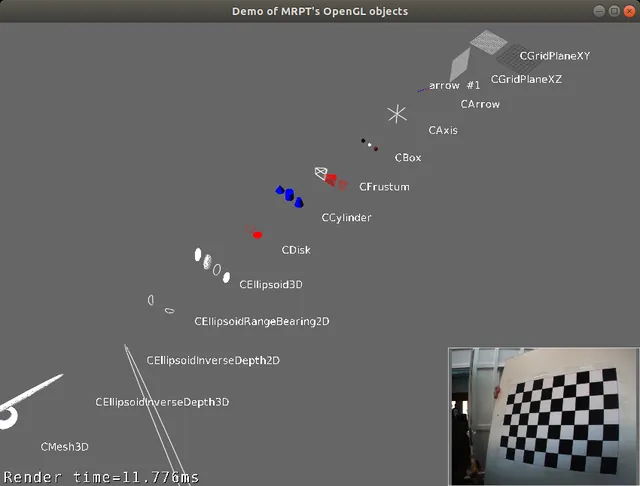
5. Existing visualization primitives
For a list of existing visualization primitive classes, browse the namespace mrpt::viz, or inspect the example: Example: opengl_objects_demo
6. Text messages
GUI windows offer the possibility of displaying any number of text labels on top of the rendered scene. Refer to:
7. Advanced UI controls
For more advanced UI controls, including subwindows that can be dragged, minimized and restored, etc. see:
8. What’s new in MRPT 3
8.1 Architecture changes
Two-module split : The scene graph (
mrpt_viz) is now fully decoupled from the OpenGL renderer (mrpt_opengl). Scenes can be built and serialized on systems with no GPU.Proxy pattern : Each visual object is compiled into one or more
RenderableProxyobjects that own all GPU resources. Incremental updates only re-upload data for dirty objects.Shader-based pipeline : All rendering now goes through GLSL shaders. The fixed-function OpenGL pipeline is gone. Custom shaders can be installed per-viewport via
ShaderProgramManager.Shadow mapping : Real-time PCF soft shadows: cascaded shadow maps for the primary directional light, and cube shadow maps for point and spot lights.
Sky box :
mrpt::viz::CSkyBoxrenders a cube-mapped background at “infinity” via the dedicatedSKYBOXshader andSkyBoxProxy.Off-screen rendering :
CFBORenderuses EGL for true headless rendering without a display server.
8.2 Rendering quality improvements
Blinn-Phong specular lighting (MRPT 2.14): All four lighting shaders switched from Phong (
reflect()) to Blinn-Phong (half-vector). Per-object specular exponent exposed viaCVisualObject::materialSpecularExponent()(default 32; typical range 8–128). Also fixed: specular intensity was never uploaded for textured objects due to a uniform name mismatch.Gamma-correct rendering (MRPT 2.14): All color textures are stored internally as
GL_SRGB8/GL_SRGB8_ALPHA8;GL_FRAMEBUFFER_SRGBis enabled during rendering so the GPU handles the full sRGB pipeline for free (decode at sampling, encode at output). Controlled byTLightParameters::gamma_correction(default:true).CFBORender‘s framebuffer attachment also usesGL_SRGB8so off-screen output is equally correct.Normal mapping : Tangent-space normal maps can be assigned to any textured object via
assignNormalMap(CImage). The textured lighting shaders build a per-fragment TBN matrix from the interpolated vertex normal and tangent, sample the normal map (texture unit 2), and use the perturbed normal for all lighting calculations. When no normal map is assigned a 1x1 flat-blue default texture preserves the original geometric normal at zero extra cost. CAssimpModel loads normal maps from model materials automatically. See section 2.9 for details.Multiple lights : up to 8 directional, point and spot lights, with distance attenuation and an optional
rangewhere they fade to zero, and hemisphere ambient lighting. Any of them can cast shadows. See sections 2.7 and 2.11.Emission : per-object emissive color and emissive maps (also loaded by CAssimpModel). See section 2.11.
9. TO-DO list
Proposed improvements:
Tier 1 - Low effort, high visual impact
Normal mapping DONE
Normal maps add dramatic surface detail (brick walls, terrain, metal panels) without extra geometry. This is the single biggest visual quality improvement per GPU cycle.
Implemented:
Added texture unit 2 (
NORMAL_MAP_TEXTURE_UNIT) for normal maps.Added
assignNormalMap(CImage)toVisualObjectParams_TexturedTriangles(applies to CSetOfTexturedTriangles, CMesh, CAssimpModel, etc.).Tangent vectors are computed per-vertex: Assimp provides them via
aiProcess_CalcTangentSpace; for other objects, tangents are computed from UV deltas as a fallback in the proxy compilation step.Added
tangentfield toTTriangle::Vertexand tangent buffer at vertex attribute location 4.All four textured lighting shaders (textured-triangles-light and textured-triangles-shadow-2nd, vertex + fragment) build a TBN matrix in the fragment shader from the interpolated normal and tangent, sample the normal map, and transform the perturbed normal to world space for lighting.
When no normal map is assigned, a 1x1 flat-blue default texture (128,128,255) is bound, producing the identity tangent-space normal (0,0,1) — zero branching, identical to pre-normal-mapping rendering.
CAssimpModel automatically loads normal map textures from Assimp materials (
aiTextureType_NORMALSandaiTextureType_HEIGHT).Normal map textures are uploaded as linear data (
isColorData = false) to bypass sRGB decoding.Serialization version bumped to 4 with backwards compatibility.
GPU cost: one extra texture sample + one 3×3 matrix multiply per fragment.
Specular/gloss map support
Allows per-texel variation of shininess (e.g. wet vs dry areas, metallic highlights on a robot chassis).
Proposal:
Add texture unit 3 for a specular/gloss map (R = specular intensity, G = exponent or roughness).
When not assigned, use a 1x1 default matching the per-object material values.
Minimal shader cost: one extra texture sample.
Simple distance fog DONE (
TLightParameters::fog_*)
Useful for outdoor robotics scenes, large point clouds, depth cueing.
Proposal:
Add to Viewport or TLightParameters: fogEnabled, fogColor, fogNear, fogFar, fogDensity, fogMode (linear/exponential).
In the fragment shader: float fogFactor = clamp((fogFar - dist) / (fogFar - fogNear), 0, 1); color = mix(fogColor, color, fogFactor);
One subtract, one divide, one mix per fragment.
GPU cost: essentially zero.
Hemisphere ambient lighting DONE (
ambientSkyColor,ambientGroundColor)
Replace the flat ambient scalar with a sky/ground color pair. Surfaces facing up get sky ambient, surfaces facing down get ground ambient, with smooth interpolation. Much more
natural outdoor look.
Proposal:
Add ambientSkyColor and ambientGroundColor to TLightParameters (default both to current ambient * color).
In shader: vec3 ambientColor = mix(groundColor, skyColor, 0.5 + 0.5 * normal.z);
One mix per fragment, no extra textures.
Tier 3 - Higher effort, nice-to-have
Screen-Space Ambient Occlusion (SSAO) — implemented (see section 2.10)
Cascaded Shadow Maps (CSM) — implemented (see section 2.7)
Point and spot light shadows DONE (see section 2.7). Possible follow-up: share the cube shadow maps between the viewports rendering the same scene (they do not depend on the camera).
Suggested implementation order to maximize visual improvement per commit:
SSAO (Tier 3.9) — done